

Merlin Chrome Extension: Useful Guide to Features, Pricing, and Gmail Integration
You’re reading an article and want to ask an AI about it without opening a new tab, copying the text, and pasting it into ChatGPT. That specific friction point is why the Merlin Chrome extension exists, and it’s why it’s become one of the more widely installed AI browser tools, with roughly 900,000 active users on the Chrome Web Store as of mid-2026.
This guide covers what the Merlin AI Chrome extension actually does, how the Gmail integration works, what it costs, and what most reviews leave out: what data it collects and where it genuinely falls short. If you’re deciding whether to install it, this should answer that without requiring you to dig through five different pricing pages first.
What Is the Merlin Chrome Extension?
Merlin AI is a Chrome extension made by Foyer Tech that adds a sidebar AI assistant to whatever webpage you’re browsing. Instead of switching to a separate ChatGPT tab, you press Cmd+M (Mac) or Ctrl+M (Windows), and a chat panel opens right there, already aware of the content on your screen. If you’re curious about how these conversational tools function under the hood, check out our guide on AI chatbots and assistants.
The extension itself doesn’t build its own AI model. It’s a front-end layer that gives you access to models from several different providers, including OpenAI’s GPT series, Anthropic’s Claude, Google’s Gemini, and others, all from one interface, so you’re not paying for and switching between four separate subscriptions.
That “one login, many models” pitch is Merlin’s core value proposition, and it’s genuinely useful for anyone who regularly bounces between different AI tools depending on the task, using one model for coding help and another for long-form writing, for example.
Key Features of the Merlin AI Chrome Extension
Multi-Model Access From a Single Sidebar
Merlin bundles access to more than a dozen large language models. You can switch models mid-conversation depending on what you’re doing, using a more reasoning-focused model for a technical question and a different one for creative writing, without leaving the sidebar or losing your place on the page.
Chat With Any Webpage
Open Merlin on an article, product page, or long report, and it can summarise the content, answer specific questions about it, or extract key points, all without you needing to copy and paste text manually. This also works on PDFs opened in the browser, which is useful for research-heavy work.
YouTube Video Summaries
This is consistently the feature reviewers single out as the most immediately useful. Merlin reads a video’s captions and produces a bullet-point summary, so you can decide whether a 40-minute video is worth your time before you commit to watching it, or extract the key information without watching at all.
Writing Assistance in Text Boxes
Merlin adds contextual writing help wherever you’re typing: LinkedIn posts, tweets, comment sections, and forms. It can rewrite a paragraph for clarity, adjust tone, or expand a rough draft into a fuller piece of writing, directly inside the text box you’re already using.
Projects and Saved Prompts
For repeated tasks, Merlin lets you save prompt templates and organize files, links, or notes into “Projects,” essentially a lightweight custom AI assistant built around a specific knowledge base you’ve uploaded, useful if you’re doing the same type of research or writing task repeatedly.
Translation Across 50+ Languages
Merlin can translate selected text, full webpages, or even localize text embedded in images, and it supports bilingual subtitles on YouTube videos in addition to standard page translation.
Merlin AI Chrome Extension in Gmail
The Gmail integration is one of the most frequently searched features, and it’s worth explaining exactly how it behaves rather than just confirming its existence.
Once installed, Merlin adds an AI assistant directly inside Gmail’s compose window. You can:
- Draft a full email reply from a short instruction, like “write a polite decline to this meeting request”
- Summarise a long email thread before you reply, so you don’t have to scroll through the entire back-and-forth
- Adjust the tone of a drafted email, making it more formal, more casual, or more concise
- Generate follow-up messages based on the context of a previous email in the thread
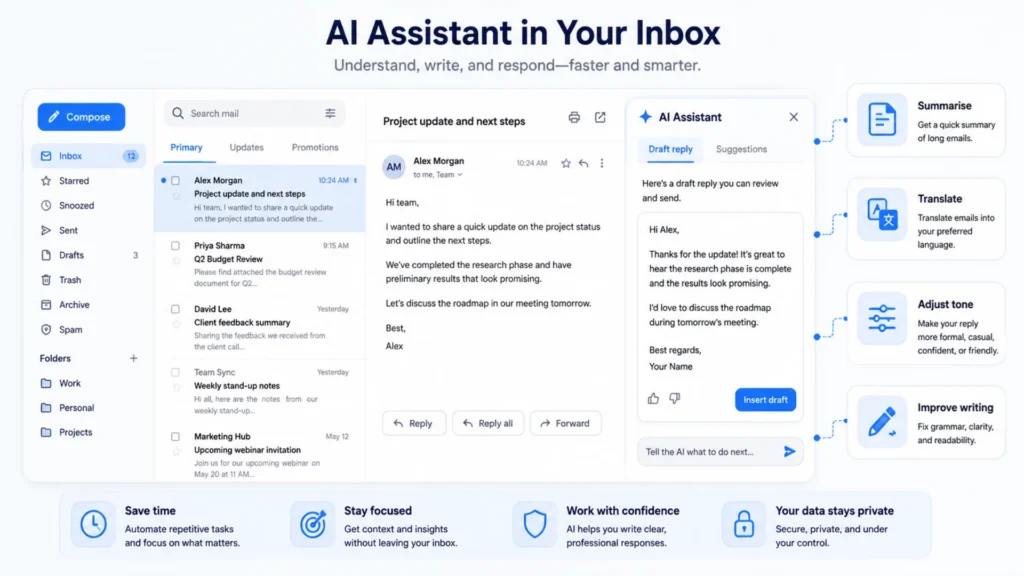
The practical benefit here is speed. Instead of drafting an email, then separately opening an AI chat to polish it, then copying the result back into Gmail, the whole loop happens inside the compose window itself. For anyone who spends a meaningful chunk of their workday in their inbox, that’s a real time saver rather than a gimmick feature.
The Merlin Chrome extension needs to read email content to generate contextual replies and summaries; anyone handling sensitive or confidential correspondence should think carefully about what they’re comfortable running through a third-party AI layer inside their inbox, a point that applies to any AI email tool, not just Merlin.
How to Install the Merlin Chrome Extension
- Go to the Chrome Web Store and search for “Merlin AI,” or search for ” Merlin Chrome extension” on Google.
- Click Add to Chrome, then confirm the permissions prompt.
- Pin the extension to your toolbar for easy access. Click the puzzle-piece icon in Chrome’s toolbar and select the pin next to Merlin.
- Create a free account; this step is required to unlock the daily query allowance rather than a hard paywall.
- Adjust settings as needed, including which sites the sidebar appears on automatically, since some users prefer to trigger it manually with the keyboard shortcut rather than have it appear on every page.
The whole process takes under two minutes, and no credit card is required to start using the free tier.
Merlin Chrome Extension Pricing
As of mid-2026, Merlin’s pricing structure looks like this:
- Free plan: Roughly 100 queries per day across supported models, no credit card required. This is a genuinely generous free tier compared to most competing AI browser extensions.
- Pro plan: Around $19 per month on annual billing (closer to $29 billed monthly), which unlocks higher-tier models like GPT-5 and Claude Opus, along with a much higher usage cap.
- Teams plan: Roughly $15 per seat per month, with a lower minimum seat requirement than earlier pricing structures, aimed at small teams seeking centralized billing.
The word “unlimited” shows up in Merlin’s own marketing for the Pro plan, but it’s worth understanding what that actually means. Independent reviews have found that the “unlimited” tier is subject to a fair-use cap, roughly equivalent to $100 to $150 in underlying API usage per month, after which response speed or model access can be throttled. For casual to moderate use, that cap is unlikely to matter. For someone running hundreds of heavy queries a day against premium models, it’s worth knowing about before you commit to an annual plan.
Is the Merlin AI Chrome Extension Safe to Use?
This is a fair question for any tool that reads the content of the pages you’re browsing, and it deserves a direct answer rather than a vague reassurance.
According to Merlin’s own Chrome Web Store data safety disclosure, the extension collects personally identifiable information and location data as part of its stated functionality. The developer states this data is not sold to third parties and is not used for unrelated purposes or for determining creditworthiness, disclosures that are required under Chrome Web Store policy rather than optional marketing claims.
Practically speaking, that means:
- Content you interact with through the Merlin Chrome extension, including webpage text, emails, and documents, is processed by the underlying AI models to generate a response.
- You should avoid running highly sensitive material, like confidential legal documents, health records, or proprietary company data, through any browser-based AI assistant unless your organization has specifically vetted and approved that tool for that use.
- Reviewing the extension’s permissions during installation and periodically afterward in Chrome’s extension settings is good practice for any tool with this level of page access, not just Merlin.
None of this makes the Merlin Chrome extension unusually risky compared to similar tools. Most AI browser extensions require broad page-reading permissions to function at all. But it’s a category of tool where understanding what you’re granting access to matters more than with a typical utility extension, and that context is missing from most reviews that focus purely on features.
Merlin Chrome Extension vs. Other AI Extensions
Merlin’s closest competitors include tools like Monica and various dedicated ChatGPT sidebar extensions. The meaningful difference usually comes down to model breadth versus specialization.
Monica offers a similar multi-model sidebar approach with comparable pricing. Dedicated single-model extensions, like a ChatGPT-only sidebar, tend to be cheaper or free, but lock you into one provider’s strengths and limitations. Writing-focused tools like Grammarly go deeper into grammar and style specifically but don’t offer the same multi-model chat or YouTube summarisation functionality.
If your main need is to switch between different AI models depending on the task without paying for separate subscriptions to each, Merlin’s positioning makes sense. If you only ever use one model and want the cheapest, lightest way to access it in your browser, a single-provider extension may serve you better and ask for fewer permissions.
Common Mistakes to Avoid
Assuming “unlimited” means no cap. As covered above, the Pro plan’s unlimited tier has a fair-use ceiling. Budget-conscious heavy users should track their usage rather than assuming there’s no limit at all.
Letting the sidebar auto-trigger on every page. Some users find the popup icon appearing in every text box intrusive. Merlin’s settings allow you to limit where it activates automatically, worth adjusting early rather than living with the friction.
Running sensitive data through it without checking your organization’s policy. If you use the Merlin Chrome extension for work, particularly inside Gmail or shared documents, confirm your employer’s stance on third-party AI tools with page-reading access before making it part of your daily workflow.
Skipping the free tier evaluation period. Given how generous the free plan’s daily query allowance is, there’s little reason to jump straight to a paid plan before testing whether the extension actually fits your workflow.
Frequently Asked Questions
Is the Merlin Chrome extension free?
Yes, Merlin offers a free plan with roughly 100 queries per day and no credit card required. Paid Pro and Teams plans unlock higher usage caps and access to premium models.
Does the Merlin AI Chrome extension work in Gmail?
Yes. Merlin integrates directly into Gmail’s compose window, allowing you to draft replies, summarise email threads, and adjust tone without leaving your inbox.
What AI models does Merlin support?
Merlin provides access to more than a dozen models from providers including OpenAI’s GPT series, Anthropic’s Claude, and Google’s Gemini, all switchable via a single sidebar interface.
Is Merlin AI available for browsers other than Chrome?
Merlin also offers extensions or apps for Edge and mobile platforms, though the core sidebar experience is most fully developed on Chrome, which remains its primary supported browser.
Does Merlin store the content of pages I browse?
Merlin’s data safety disclosure states that it collects personal and location data as part of its core functionality and confirms that this data isn’t sold to third parties. As with any AI browsing tool, avoid running highly sensitive documents through it without first checking your organization’s data policy.
How is Merlin different from just using ChatGPT directly?
ChatGPT requires switching to a separate tab and manually copying content over. Merlin overlays directly on the page you’re already viewing, works across multiple AI models instead of just one, and adds features like YouTube summarisation and Gmail integration that ChatGPT’s own interface doesn’t include natively.
Final Thoughts
The Merlin Chrome extension solves a specific, real problem: the constant switching between tabs to use AI tools. The YouTube summarizer and Gmail integration are the two features that consistently earn praise across independent reviews, and the free tier is generous enough to actually evaluate before paying anything.
The trade-offs are worth going in with eyes open. The “unlimited” Pro plan has a usage cap that isn’t obvious at signup, and like any tool with broad page-reading permissions, it’s worth being deliberate about what content you run through it. For general browsing, writing, and research tasks, though, it’s a genuinely useful layer to add to Chrome rather than an overhyped one.
For more background on how browser extensions like this one work under the hood, Wikipedia’s overview of browser extensions is a useful primer on the permissions model and architecture involved.