
How to Build an AI Agent? The Ultimate Guide to Doing It Successfully
Most tutorials on how to build an AI agent throw you straight into a framework, a wall of code, or a marketing pitch for a no-code platform, without ever explaining what actually makes something an “agent” instead of just a chatbot with extra steps. That gap is where most beginners get stuck, not on the code itself.
This guide fixes that. It explains what an AI agent actually is, walks through both the no-code and code paths to building one, and includes a real working example you can run yourself. It also covers the parts most competing guides skip entirely: how to choose between the dozen frameworks that all claim to be “the standard,” how the Model Context Protocol changed how agents connect to tools, and how to actually test an agent before you trust it with anything important.
What Is an AI Agent, Really?
An AI agent is a program built around a large language model that can decide its next step, call external tools to take action, maintain state across multiple turns, and continue working toward a goal without a human manually approving every move.
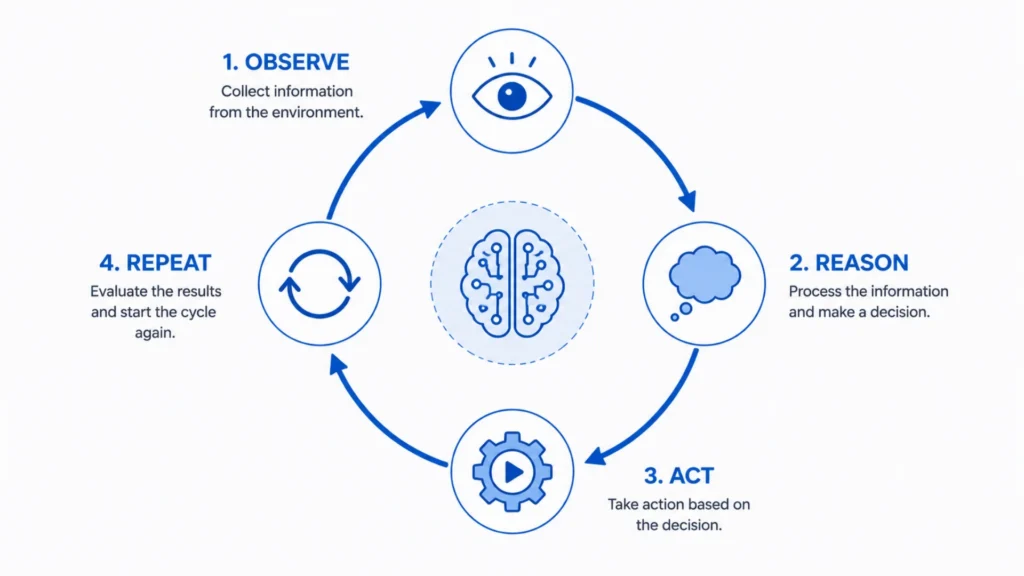
That last part is the real dividing line. A chatbot answers one question at a time. A basic AI workflow follows a fixed script: do step one, then step two, then step three, no matter what happens along the way. An agent is different: it observes the result of its last action and decides what to do next based on that result, looping through a reason-act-observe cycle until the task is actually done or it needs your input.
A concrete example makes this click faster than a definition does. Say you ask an agent to “find the cheapest flight to Chicago next weekend and add it to my calendar.” A simple chatbot would tell you how to search for flights. An agent actually searches a flight API, compares the results, picks the cheapest option that meets your criteria, and calls a calendar tool to add the event, adjusting its approach if, say, the first flight search API times out and it needs to try a different source.
Two Paths to Building an AI Agent
Depending on your technical background and what you’re trying to build, there are really two legitimate starting points, and picking the wrong one is the single most common reason people give up halfway through. As AI agents take over repetitive workflows, understanding what jobs are safe from AI automation can help you focus your agent-building efforts on tasks that benefit most from human-in-the-loop oversight.
The No-Code Path
If you want to make an AI agent that handles a specific business task- sending follow-up emails, updating a spreadsheet when a form is submitted, summarising new Slack messages- you likely don’t need to write any code at all.
Platforms like Zapier MCP, Make, n8n, and MindStudio let you connect an AI model to thousands of existing app integrations through a visual interface. You describe what you want in plain language or wire together a simple flowchart, and the platform handles the underlying tool connections, authentication, and error handling.
Zapier MCP now exposes more than 9,000 app integrations as tools an AI agent can call directly, using the Model Context Protocol, which is covered in more detail below. For a first agent, or for a business workflow that doesn’t require custom logic, this is genuinely the fastest and most reliable path, and it’s a completely legitimate long-term solution for a wide range of real-world use cases.
The Code Path
If you need custom logic, want full control over how the agent reasons, or you’re building something meant to scale into a production product, you’ll want to build in code, typically Python, using either a dedicated agent framework or a lighter-weight SDK from a model provider.
This path takes longer to get started, but it gives you control over exactly how the agent thinks, what it’s allowed to do, and how it fails when something goes wrong, control that no-code platforms deliberately trade away in exchange for simplicity.
The Core Building Blocks Every AI Agent Needs
Regardless of which path you take, every real AI agent is built from the same five components. Understanding these makes every framework’s documentation click faster.
A reasoning engine. This is the large language model itself- GPT, Claude, Gemini, or an open-source model- responsible for interpreting the goal and deciding what to do next at each step.
Tools. These are the functions the agent can actually call: searching the web, querying a database, sending an email, running code. An agent without tools is just a chatbot, no matter how good its reasoning is.
Memory. Short-term memory tracks the current conversation or task. Longer-term memory, often backed by a vector database, lets an agent recall information across separate sessions, useful for anything that needs to remember your preferences or past interactions.
An orchestration loop. This control logic manages the reason-act-observe cycle: deciding when the agent has enough information to act, when to call another tool, and when the task is genuinely finished.
Guardrails. Rules and checks that limit what the agent can do autonomously, requiring human approval before it sends an email or spends money, for example, rather than letting it act on every decision without oversight.
Build Your First AI Agent in Python
Here’s a simplified but genuinely functional example of the reasoning loop at the heart of every agent, built using basic tool-calling with an LLM API. This strips away framework abstractions so you can see exactly what happens underneath.
python
import json
def get_weather(city):
# In a real agent, this would call an actual weather API
return f”It’s 68°F and sunny in {city}.”
def get_time(city):
return f”The current time in {city} is 2:45 PM.”
# Map tool names to actual functions the agent can call
available_tools = {
“get_weather”: get_weather,
“get_time”: get_time
}
def run_agent(user_goal, model_client, max_steps=5):
messages = [{“role”: “user”, “content”: user_goal}]
for step in range(max_steps):
# Ask the model what to do next, giving it the tools it can use
response = model_client.chat(
messages=messages,
tools=[“get_weather”, “get_time”]
)
If response.tool_call:
tool_name = response.tool_call.name
tool_args = response.tool_call.arguments
result = available_tools[tool_name](**tool_args)
# Feed the tool’s result back so the model can decide the next step
messagesappend({“role”: “assistant”, “content”: None, “tool_call”: response.tool_call})
messages.append({“role”: “tool”, “content”: result})
else:
# No more tools needed, the agent has its final answer
return response. content
return “Agent reached max steps without finishing.”
This is the actual skeleton that every major framework—LangGraph, CrewAI, the OpenAI Agents SDK—is built on. They add state management, retries, logging, and multi-agent coordination, but the core loop—ask the model what to do, call a tool, feed the result back, repeat—is exactly what’s shown above.
To turn this into something real, you’d swap the placeholder functions for actual API calls, connect it to a real model provider’s SDK, and add error handling for when a tool call fails or the model gets stuck in a loop, a problem worth taking seriously before you deploy anything beyond a demo.
Understanding MCP and Why It Matters for Building Agents
If you’ve researched how to create an AI agent recently, you’ve likely run into the term MCP, the Model Context Protocol. Anthropic open-sourced it in late 2024, and by 2026 it’s become the standard way agents connect to external tools, adopted natively by Anthropic, OpenAI, Google, and Microsoft, and supported as the default tool-calling layer in frameworks like LangChain, CrewAI, and LlamaIndex.
Before MCP, connecting an agent to five different services meant writing five separate custom integrations, each with its own authentication method and data format. MCP solves this with a standardized client-server structure: an MCP server exposes tools, data resources, and prompt templates in a consistent format, and any MCP-compatible agent can discover and use them without writing custom code for each.
Practically, this means you can now connect an agent you build to an existing ecosystem of MCP servers, GitHub, Slack, Notion, databases, and thousands more, rather than building every integration yourself. If you’re building a serious agent in 2026, understanding MCP isn’t optional background reading; it’s the connective layer most new tools are built around.
Choosing the Right Framework
There’s no single best framework, and most experienced builders choose based on the shape of the problem rather than popularity alone.
| Framework | Best For | Learning Curve |
|---|---|---|
| LangGraph | Production systems needing explicit state control and human-in-the-loop checkpoints | Moderate to steep |
| CrewAI | Fast multi-agent prototypes with role-based team design | Low |
| OpenAI Agents SDK | Single agents built natively on OpenAI’s tools and models | Low |
| Claude Agent SDK | Single agents built natively on Anthropic’s tools and models | Low |
| Pydantic AI | Lightweight, type-safe agents for narrow, well-defined tasks | Low |
| LlamaIndex | Agents centered on retrieval and document-heavy workflows | Moderate |
A reasonable rule of thumb: for a narrow, well-defined task, start with a lightweight option like Pydantic AI or a provider’s native SDK. Reach for LangGraph specifically when you need explicit branching logic, retries, or long-running state that must survive a restart. Save multi-agent frameworks like CrewAI for when a task genuinely benefits from multiple specialized agents working together, not just because it sounds more sophisticated.
Testing and Debugging Your Agent
This is the step most beginner guides skip entirely, and it’s where a surprising number of agent projects quietly fail after the demo stage.
Log every tool call. When an agent picks the wrong tool or gets stuck in a loop, you need to see the exact sequence of decisions it made, not just the final output.
Set a maximum step limit. Without one, a confused agent can loop indefinitely, burning API credits on repeated tool calls that never resolve the task.
Test with adversarial inputs, not just happy-path examples. Try ambiguous inputs, missing information, or deliberately contradictory inputs, since that’s where agents tend to fail in production even when they work fine in a clean demo.
Use a tracing tool once you move past prototyping. Platforms like LangSmith give you a step-by-step visual trace of an agent’s reasoning, which turns debugging from guesswork into something you can actually diagnose.
Common Mistakes When Building an AI Agent
Giving the agent too many tools at once. An agent with 30 available tools tends to pick the wrong one more often than an agent with 5 well-scoped ones. Start narrow and expand deliberately.
Skipping guardrails because the demo worked fine. A demo running on your own test data behaves very differently from an agent handling real user input with real consequences attached to a wrong action.
Choosing a framework based on GitHub stars instead of the actual problem shape. Popularity signals adoption, not fit. A framework built for complex multi-agent orchestration is often overkill and genuinely harder to debug for a task that only needs one agent and two tools.
Not setting a hard limit on autonomous actions. Especially for anything involving spending money, sending communications, or modifying real data, requiring a human checkpoint before the agent commits to an irreversible action is a basic safeguard worth building in from day one, not adding after something goes wrong.
Tips for Leveling Up Your First Agent
Once your basic agent works, a few upgrades make the biggest practical difference: add persistent memory so it doesn’t start from zero every session, connect it through MCP to expand its available tools without writing custom integrations for each one, and add a simple evaluation set, a handful of test tasks you re-run every time you change the agent’s logic, so you can tell whether a change actually made it better or just different.
Frequently Asked Questions
How do I make an AI agent without coding?
Platforms like Zapier MCP, Make, and n8n let you build a functional AI agent through a visual interface, connecting an AI model to app integrations without writing code. This is the fastest path for business workflows and doesn’t require a programming background.
How to build AI agents that use multiple tools?
Give the agent access to a defined set of tools, ideally through a standard like MCP rather than custom one-off integrations, and use a framework like LangGraph or CrewAI to manage the reasoning loop that decides which tool to call and when.
What’s the difference between how to build an AI agent and how to create an AI chatbot?
A chatbot responds to messages one at a time and can’t take independent action. An AI agent can call external tools, hold state across a multi-step task, and decide its own next move without a human directing every step.
Do I need to know Python to build an AI agent?
Not necessarily. No-code platforms handle the technical implementation for you. For custom logic, production-scale reliability, or full control over the agent’s reasoning, Python is the most common language, with frameworks like LangGraph and CrewAI, as well as provider SDKs from OpenAI and Anthropic, all built around it.
What is MCP, and do I need to use it?
The Model Context Protocol is an open standard that lets AI agents connect to external tools and data sources through a single, consistent interface rather than custom integrations for each. You don’t strictly need it for a simple agent with one or two tools, but it’s become the default approach for anything beyond that as of 2026.
How much does it cost to build and run an AI agent?
Costs come primarily from the underlying model’s API usage, priced per token, plus any platform fees for no-code tools. A simple agent handling light use might cost a few dollars a month; a production agent making frequent, complex tool calls at scale can run into hundreds or thousands of dollars monthly, depending on model choice and volume.
For deeper technical grounding, Wikipedia’s entry on intelligent agents covers the broader academic definition that this modern wave of AI agents builds on, going back well before large language models existed.
Conclusion
Building an AI agent isn’t really about picking the trendiest framework. It’s about understanding the five components- a reasoning model, tools, memory, an orchestration loop, and guardrails- and matching your approach to the actual size of the problem you’re solving. Start with a no-code platform or a narrow, single-purpose script if that’s genuinely all your task needs. Reach for a framework like LangGraph only once you actually hit the state management and branching complexity that justifies it.
The agents that work reliably in production aren’t the ones built with the most sophisticated framework. They’re the ones built narrowly, tested against real messy inputs, and given clear guardrails before anyone trusted them with something that mattered.